Change password on reedb.com: step-by-step instructions
The security of data on the Internet is an important issue. One of the basic safeguards is to change your password regularly. In this article, we will show you how to change the password on a website.
 The first step is to log into the website. Look for the "Sign In" or "Login" button. Enter your username and current password to log in.
A: Yes, you can change your password on any device as long as you have access to the website.
Q: What if I forgot my current password?
A: If you forgot your current password, go to "Forgot Password" on the login page.
Q: How often should I change my password?
A: It is recommended to change your password every 3-6 months to protect your account.
Q: Can I use the same password for multiple accounts?
A: It is not recommended to use the same password for multiple accounts as it makes it easier for hackers to gain access to all your accounts.
Q: What should I do if I suspect my account has been hacked?
A: If you suspect your account has been hacked, change your password immediately.
Q: How can I create a strong password?
A: A strong password should be at least 12 characters long and contain a combination of uppercase and lowercase letters, numbers, and special characters.
Q: How secure is my password on reedb.com?
A: reedb.com stores your password with a special encryption and is not in clear text in our database
Introduction
Changing the password is an important part of IT security to protect data. If you want to change the password of an account on a website, you need some information. In this article you will find a step-by-step guide to help you.Step 1: Login to the website
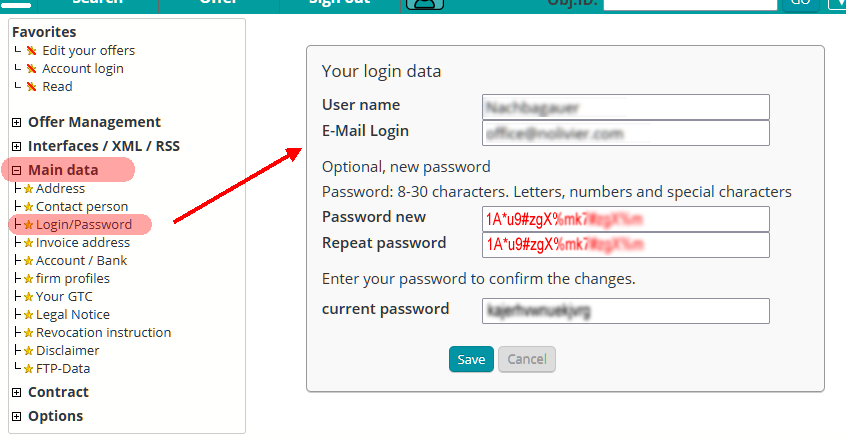 The first step is to log into the website. Look for the "Sign In" or "Login" button. Enter your username and current password to log in.
Step 2: access to master data
After you log in, look for the "Master Data" or "Profile" option. You can usually find this option in the drop-down menu under your username or profile picture.Step 3: Change password
In the master data you will find the option "Change password" or "Password". Click on it to change the password.Step 4: Enter new password
Now enter the new password. Use a combination of upper and lower case letters, numbers and special characters. Make sure you choose a password that is difficult for others to guess.Step 5: Enter current password
Next you need to enter your current password. This is for authentication to ensure that you are in fact the owner of the account.Step 6: Confirm change
When you have filled out all the fields, click on "Confirm" or "Save". The change is now implemented on the website.Conclusion
Changing the password on a website is an important step in protecting your information. By using a strong password and changing it regularly, you can increase the security of your account on the website.FAQs
Q: Can I change my password on any device?A: Yes, you can change your password on any device as long as you have access to the website.
Q: What if I forgot my current password?
A: If you forgot your current password, go to "Forgot Password" on the login page.
Q: How often should I change my password?
A: It is recommended to change your password every 3-6 months to protect your account.
Q: Can I use the same password for multiple accounts?
A: It is not recommended to use the same password for multiple accounts as it makes it easier for hackers to gain access to all your accounts.
Q: What should I do if I suspect my account has been hacked?
A: If you suspect your account has been hacked, change your password immediately.
Q: How can I create a strong password?
A: A strong password should be at least 12 characters long and contain a combination of uppercase and lowercase letters, numbers, and special characters.
Q: How secure is my password on reedb.com?
A: reedb.com stores your password with a special encryption and is not in clear text in our database

 data load ...
Ads